
Why My Andromeda Images Looked Worse After Stacking (And How I Fixed It)
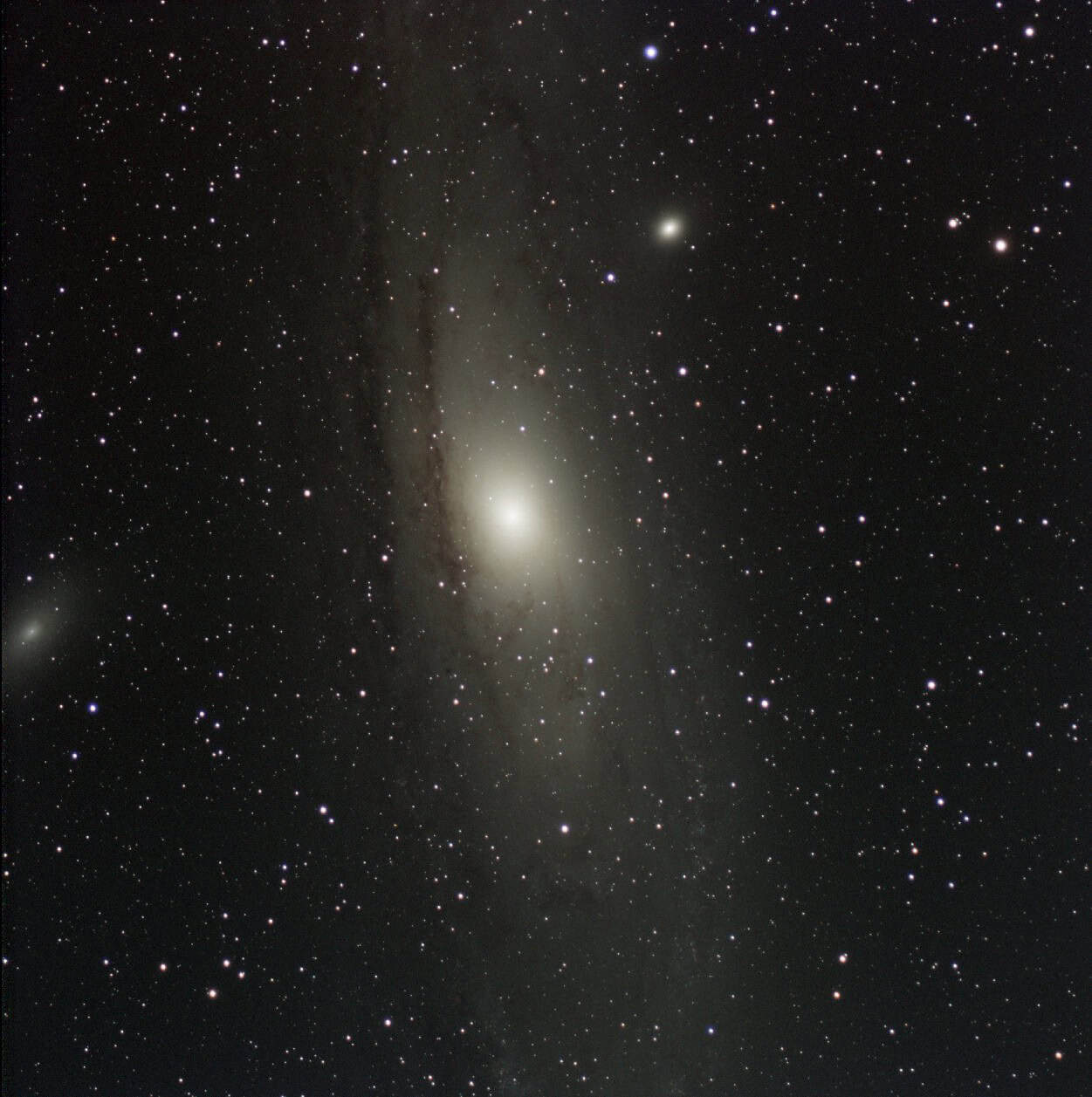
I spent over five hours imaging the Andromeda Galaxy from my Bortle 9 backyard, and the stacked image looked worse than some of my single exposures. When I opened it in GraXpert, I could barely see the stars I expected. The background was patchy, and the stars that did show up looked swollen and blown out.
Then I stacked just two of my best frames and got a galaxy with two cores. Every star had a twin sitting right beside it.
That’s when it clicked. My data wasn’t the problem. Something was going wrong after the camera had already done its job.
If a single frame stacks cleanly but two frames show doubled stars, the problem is registration, not your data. Your stacking software is combining frames without aligning them correctly. Check the registration offsets and angles, and if they look wild, run the same data through a different stacker like Siril.
Let’s dive into how I narrowed it down, what DeepSkyStacker’s numbers were telling me, and how the same data finally stacked cleanly in Siril.
The Imaging Session and Equipment
| Item | Details |
|---|---|
| Target | Andromeda Galaxy (M31) |
| Telescope | SVBONY SV503 70ED |
| Camera | ZWO ASI533MC Pro |
| Mount | Sky-Watcher Star Adventurer GTi |
| Filter | Optolong L-Pro |
| Exposure length | 120 seconds |
| Total integration | 5 hours, 14 minutes (about 157 subs) |
| Sky | Bortle 9 backyard, Florida |
| Acquisition | ZWO ASIAIR Plus |
| Original stacker | DeepSkyStacker 6.2.2 |
| Final stacker | Siril |
Why I Used the L-Pro Instead of My SV220
Most of my imaging so far has been emission nebulas with the SV220 dual-band filter, and stacking those had gone smoothly. Andromeda is different. It’s a galaxy, a broadband target, so a narrowband filter would throw away most of its light. The L-Pro keeps that broadband signal and the galaxy’s natural color.
The tradeoff is light pollution. The L-Pro lets far more skyglow through than the SV220, and from a Bortle 9 backyard that means a much brighter background.
This was also the first time I’d had this many stars in a frame, and my autofocuser was still new to me. Florida weather had limited me to only a few sessions with it. So when the stack came out wrong, I had plenty of suspects, and most of them were me.
The First Stack Looked Completely Wrong
Stacking is supposed to make things better. Combining dozens of 120-second subs raises the signal-to-noise ratio, so fainter stars and the galaxy’s outer structure come through while background noise averages down.
Here’s what I actually got:
- Far fewer visible stars than I expected
- Bloated, blown-out stars
- Strange diffuse patches that looked like smeared stars
- An uneven, blotchy background
My first instinct was to blame the L-Pro. A brighter sky background can make stars harder to pull out. But light pollution makes processing harder; it doesn’t make stars double or smear during stacking.
And when I checked the individual subs, the stars were tight and round. Whatever was happening, it wasn’t in the raw frames.
My First Suspect Was DSS Star Detection
I was stacking in DeepSkyStacker 6.2.2, which had handled my other data sets without trouble. So I assumed I’d set something wrong and started with the registration settings.
Changing the Star Detection Threshold
My threshold was set to 1%, which detected about 324 stars. Automatic detection found about 93.
I figured more stars meant better alignment. That isn’t necessarily true. DSS only needs enough reliable stars to calculate the alignment. Push detection too far and it can start picking up noise or hot pixels as stars, which makes registration less reliable, not more.
Why the Quality Scores Fooled Me
Changing the registration settings changed the quality scores a lot. In the test batch I was working with, a subset split off from the full session, frames originally scored roughly 115 to 540. Afterward, the top score jumped to just over 800, and 80 of the 110 frames scored above 400.
That looked like progress. It wasn’t. The stack still looked wrong.
DSS quality scores depend on how stars are detected and measured, so new detection settings change the scores even though the exposures haven’t changed at all. One frame with trees creeping into it still scored in the 400s. Scores are useful for comparing frames under the same settings, but they don’t tell you whether a frame will register correctly.
Next, I Looked at My Stacking Settings
My original settings were pretty typical:
| Frame type | Stacking method |
|---|---|
| Lights | Kappa-Sigma clipping, kappa 2.0 |
| Flats | Median Kappa-Sigma, 5 iterations |
| Darks | Median Kappa-Sigma, 5 iterations |
Nothing there should double stars. But I wanted to rule it out, so I simplified everything. I switched the lights to Average, left alignment on Automatic, and turned drizzle off.
Average wasn’t meant to be my final stacking method. It was a diagnostic. If the problem disappeared, that would point at pixel rejection.
It didn’t disappear. Changing how the pixels were combined did nothing, which meant the problem was somewhere else.
I Started Stacking Fewer and Fewer Exposures
This is the step that cracked it.
The Best 20 Frames
My thinking was that a handful of weak frames were dragging the stack down. So I stacked only the 20 highest-scored exposures. Same artifacts.
One Frame
Next, I ran my single best exposure through DSS on its own, with my calibration frames. It looked normal: sharp, round stars and a clear Andromeda core.
That one result ruled out bad subs and bad calibration frames at the same time. It also took focus off the list, because a focus problem would show up in a single frame too.
Two Frames
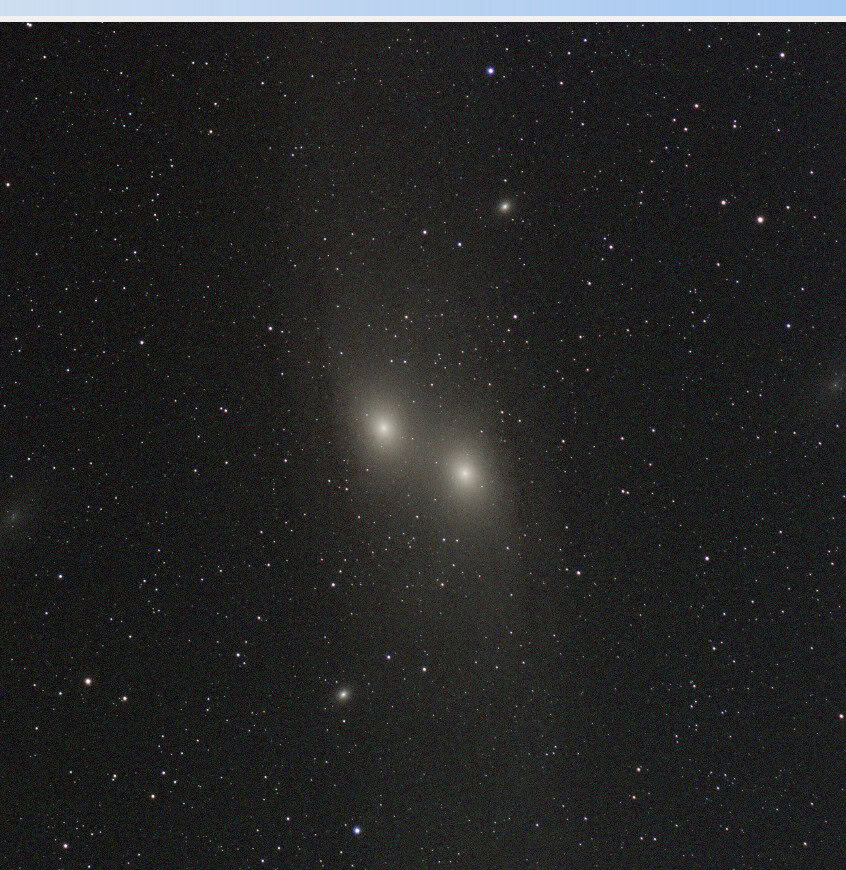
Then I stacked my two best exposures, and the problem came right back. Stars looked doubled or stretched, and parts of the galaxy looked duplicated. It was two nearly identical images laid on top of each other, one slightly shifted, with two Andromeda cores.
Why the Two-Frame Test Matters
With 157 frames, a bad result has a lot of possible causes: bad frames, tracking, changing sky conditions, calibration, settings. With two good frames, almost all of that falls away.
If two clean exposures can’t stack, the question is no longer about your data. It’s about how those two images are being aligned.
The Registration Numbers Revealed Something Was Wrong
What Registration Does
Before stacking software combines anything, it registers the frames. It finds the same stars in every exposure and calculates how far each frame needs to shift and rotate to line up with a reference frame. Frames move a little between subs even with good tracking, from guiding corrections, drift, dithering, and meridian flips.
If the software calculates the wrong transformation, stars from different frames land in different spots. Instead of one sharper star, you get doubles, smears, or swollen blobs. Add more frames and it only gets messier. That matched everything I was seeing.
Where to Find the Numbers in DSS
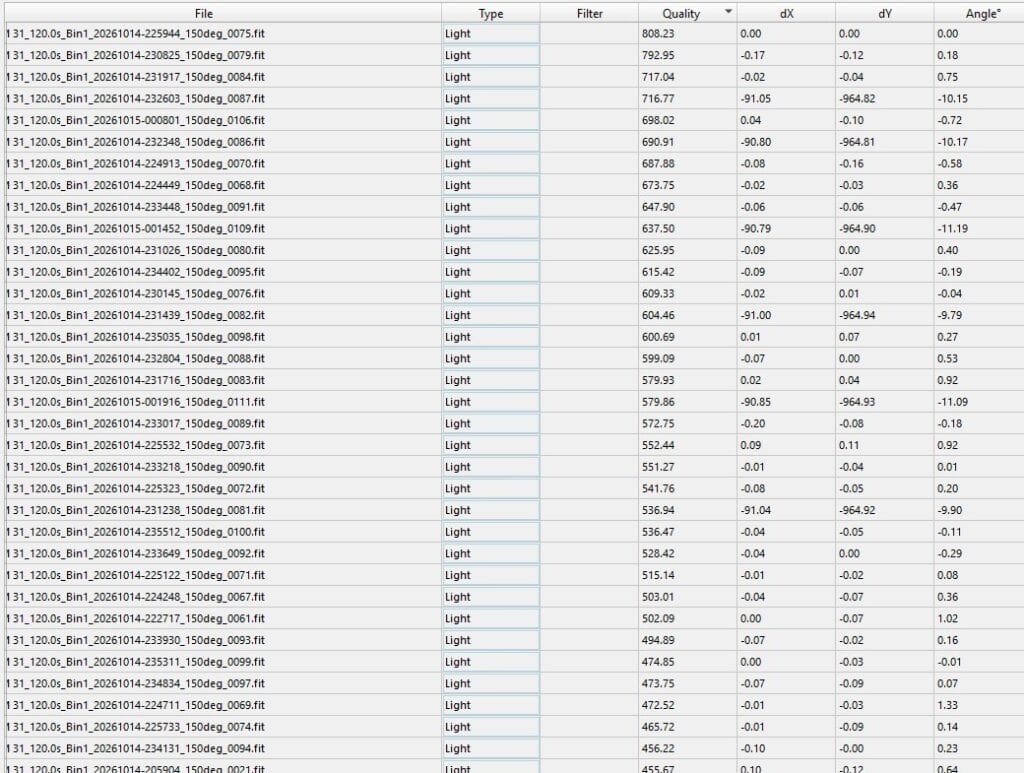
In the frame list, next to the quality score columns, DSS shows dX, dY, and Angle. dX and dY are the horizontal and vertical shift in pixels, and Angle is the rotation. All three are measured against the reference frame, which reads 0, 0, and 0.
On a guided session, most frames should sit close to 0, -1, or 1, clustered together.
What Mine Showed
Most frames looked plausible. Some didn’t. In one of my two-frame tests, the offsets were about -0.14 and -0.42, which is fine, but the angle read about -10,306°. Other frames showed large offsets and angles near -10°, while their neighbors in the sequence had much smaller values.
A camera on a tracking mount doesn’t rotate like that between two-minute subs. Those numbers didn’t describe anything that physically happened.
When I unchecked the frames with suspicious angles, the stack improved noticeably. The stars still weren’t right, but the improvement told me at least part of the problem was happening during registration.
I Thought the Meridian Flip Might Be Responsible
My filenames showed two orientations: roughly 150° and roughly 330°. That’s about a 180° difference, which is exactly what a meridian flip looks like.
So I wondered whether DSS was struggling to line up frames from before and after the flip. I grouped the 150° and 330° frames, tested them separately, and kept pulling frames with odd registration values.
It helped some, but it didn’t solve it. Frames from the same orientation group, which should have been easy to align, still produced doubled or stretched stars.
The flip may have made registration harder, but it couldn’t explain everything. And working stacking software should handle frames from both sides of a flip anyway.
Trying Siril With the Exact Same Data
By this point I’d changed star detection, stacking method, frame selection, reference frames, and registration settings. The subs looked usable, yet even two of them could produce doubled stars. Instead of tweaking one more setting, I ran the same data through Siril, a free stacking and processing program.
What DSS Users Should Know About Siril
The biggest adjustment is how Siril finds your files. In DSS, you pull images in. In Siril, you point it at a working folder, and it pulls from subfolders with specific names.
Here’s the structure that worked for me:
- lights: light frame FITS files
- darks: dark frame FITS files
- flats: flat frame FITS files
- bias: dark flat FITS files
A few things tripped me up.
FITS files go directly in the parent folder. I normally keep JPGs and FITS in separate subfolders, something like lights → fits. With Siril, it’s easier to give the JPGs their own subfolder and leave the FITS files sitting directly inside lights. Same goes for darks, flats, and dark flats.
Dark flats go in the bias folder. As I had it set up, Siril expected my dark flats in a folder named bias. The name doesn’t match what’s inside, but that’s what it looks for.
A missing folder stops everything. If one of the expected folders isn’t there, Siril won’t run. There may be a setting to change that, but matching the structure was the fastest fix for me.
The Result
Siril stacked all 157 subs, the full 5 hours and 14 minutes, without me throwing out a single frame. The stars lined up cleanly, the doubled-star artifacts were gone, and Andromeda finally looked like the data I thought I’d captured.
That’s the part that matters most. I didn’t need to discard most of the session or reshoot the target. The same exposures that fell apart in DSS were usable all along.
Was It a DeepSkyStacker Bug?
I don’t know yet. The registration values make an alignment problem the leading explanation, but I haven’t pinned down the exact cause in DSS 6.2.2.
There are a couple of possibilities. DSS may have mismatched star patterns between frames, or it may have read the coordinate and orientation data the ASIAIR stores in each FITS file in an unexpected way. DSS has a Use FITS WCS Data option that could be involved. I haven’t tested it, so treat that as a lead, not a diagnosis. If I test it, I’ll update this post.
I also wouldn’t call Siril better than DSS based on one data set. Both are capable stackers. What I can say is that Siril handled this data set with the workflow I used, and DSS didn’t.
For this session, switching software was the practical fix. I’m leaning toward Siril as my main stacker going forward, but DSS isn’t gone. It’s just no longer my only option.
What to Do If Your Stars Are Doubled After Stacking
If your stack looks worse than your subs, work through this before you delete anything:
- Check your individual subs. Zoom in. If the stars are sharp and the target is visible, your data is probably fine.
- Stack one frame with your calibration files. A clean result rules out bad subs and bad calibration frames.
- Stack two frames. Doubled stars or two cores point straight at registration.
- Read the dX, dY, and Angle columns. Look for values far outside the cluster that a meridian flip can’t explain.
- Force re-registration. Pick a good reference frame, register again, and try a different alignment method.
- Check your FITS metadata settings. For example, whether the stacker is using WCS data.
- Try another stacker. Running the same frames through a second program tells you whether the problem is your data or your workflow.
Looking back, I’d move steps 3 and 4 much earlier. I spent a lot of time changing stacking and calibration settings before I ever looked at registration. A two-frame test on day one would have saved me hours.
Final Thoughts
DeepSkyStacker couldn’t cleanly stack two of my frames. Siril stacked every sub from the full 5 hours and 14 minutes. Same data, completely different result.
Under a Bortle 9 sky, it’s easy to blame the sky first. I blamed the light pollution, the L-Pro, an autofocuser I was still learning, and my own settings. The data was fine the whole time.
The Siril stack isn’t fully stretched yet, but even GraXpert’s autostretch shows tight stars across the field, visible dust lanes, and both M32 and M110 sitting beside Andromeda. Not bad for a backyard in the middle of the city.
A better camera wouldn’t have fixed this, and neither would a darker sky. A simple test did. Before you throw away a night of imaging, make sure the problem isn’t happening after the camera has finished its job.
Tagged
In This Post
Current Setup
Equipment links are affiliate links – they help support this site at no cost to you.